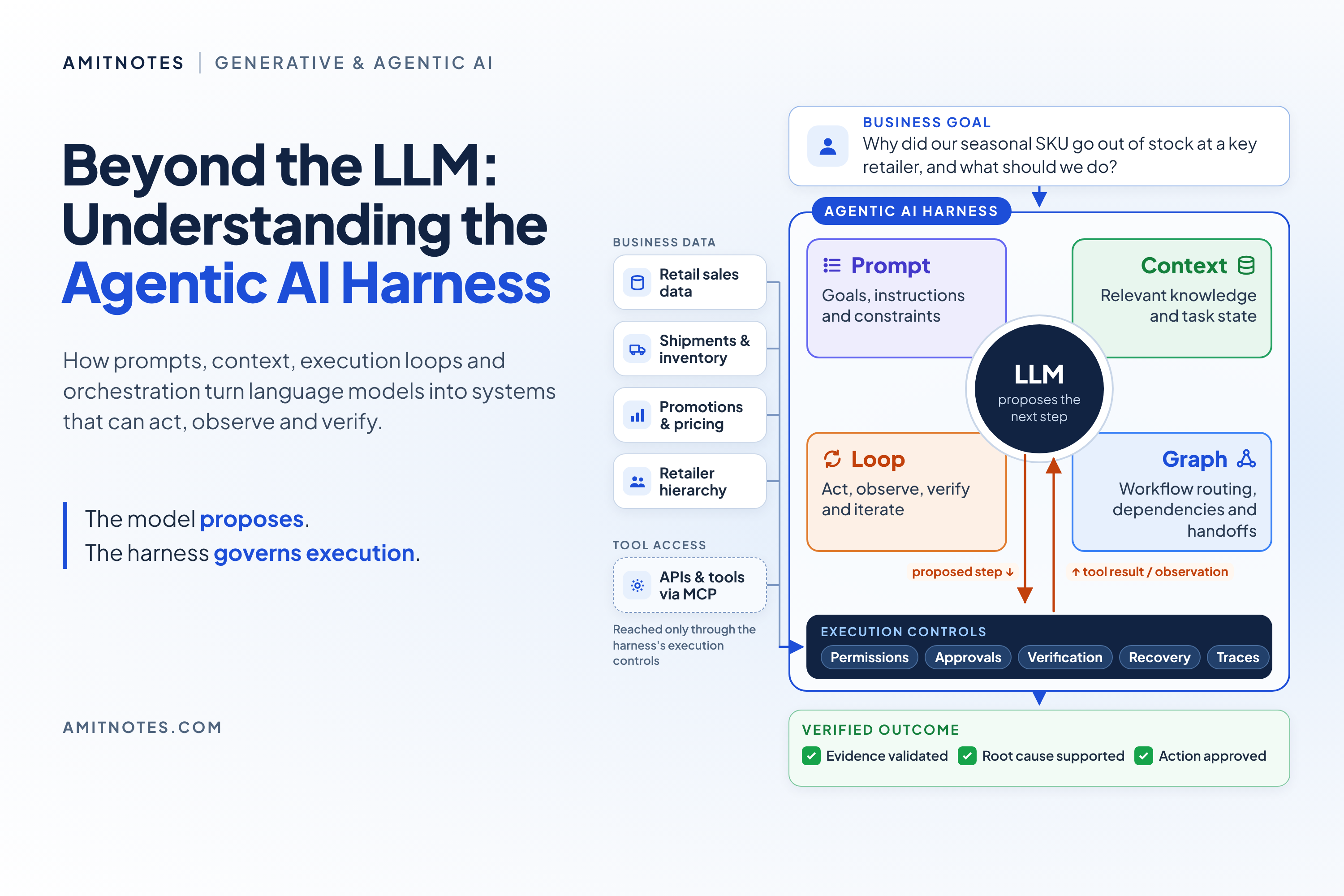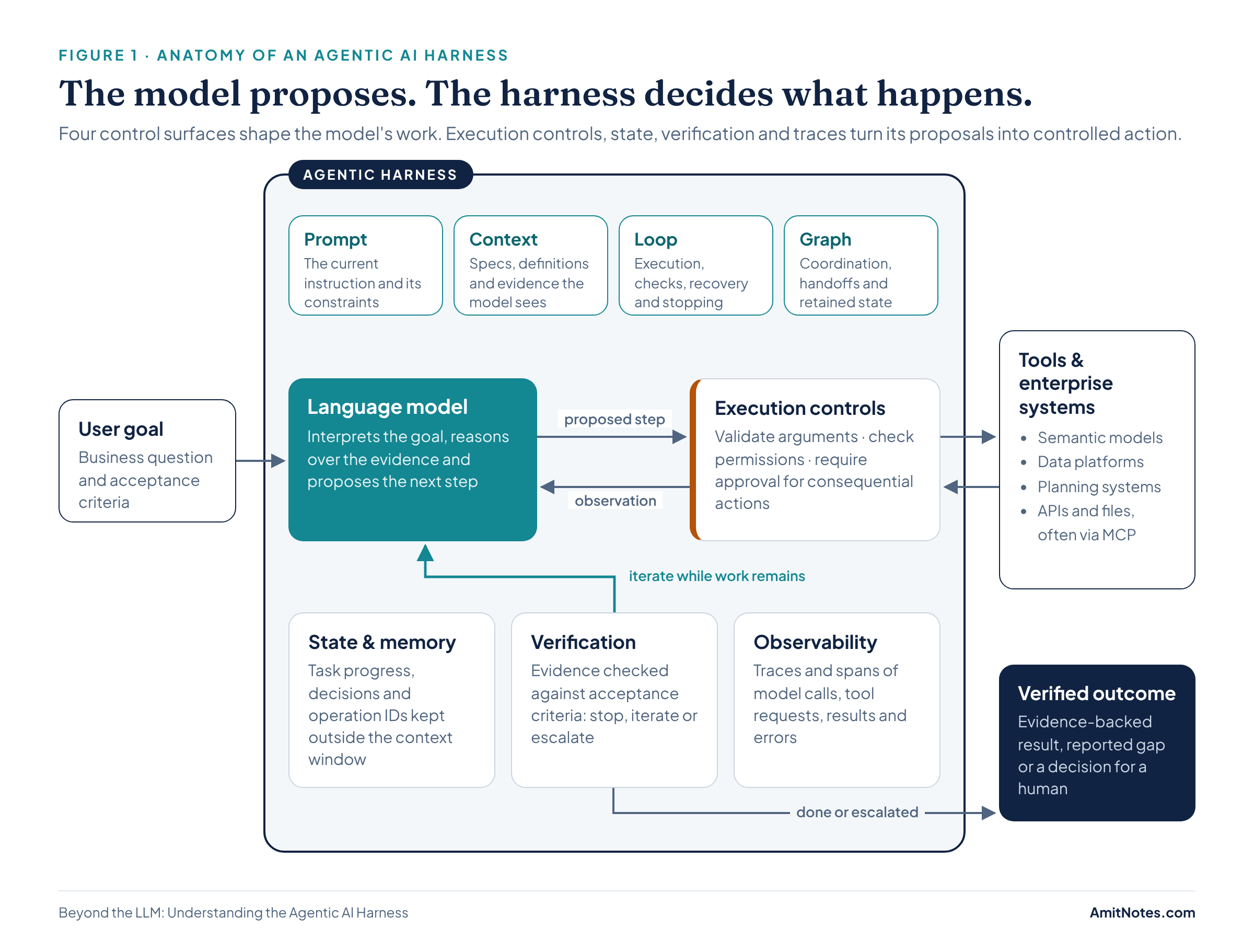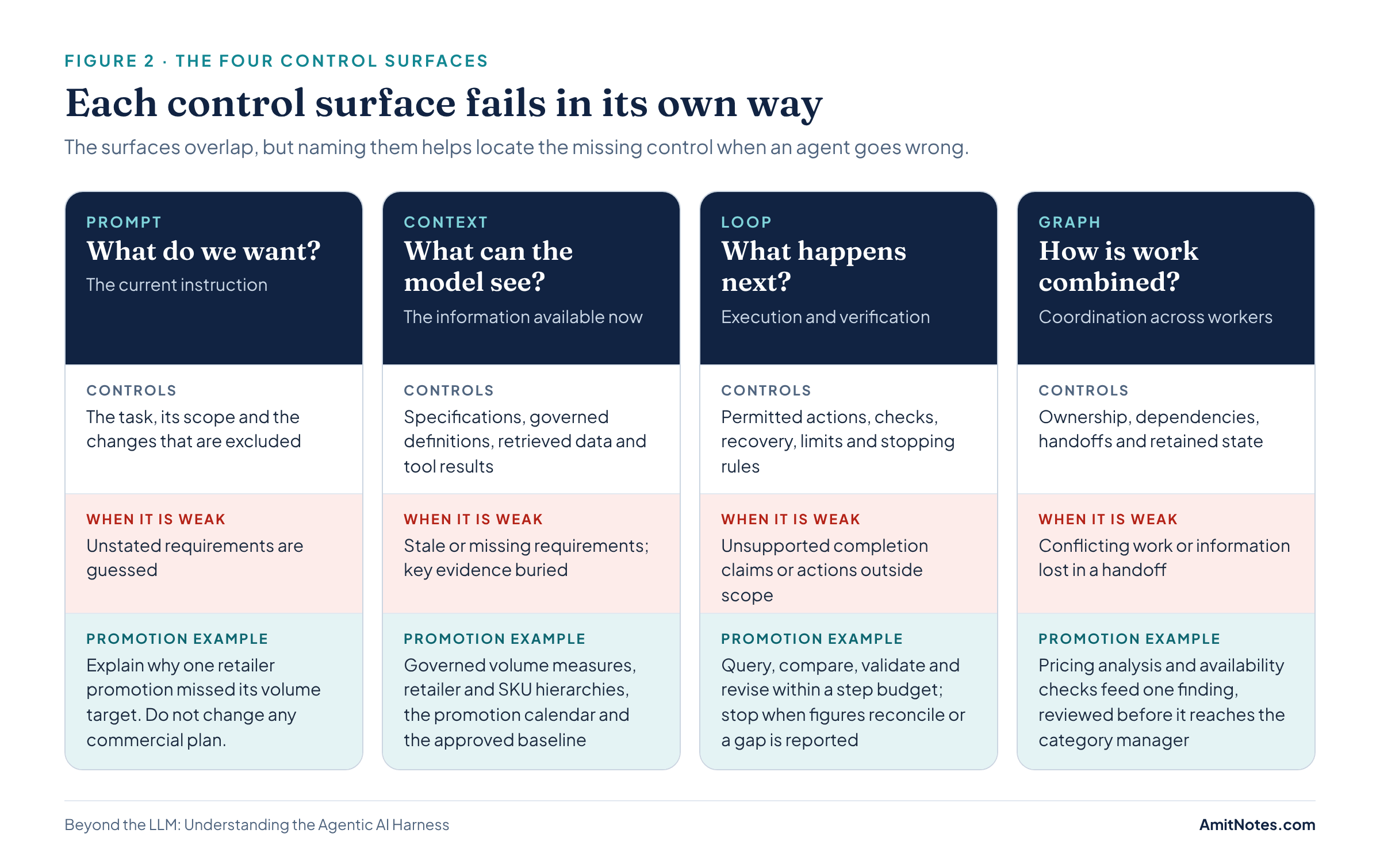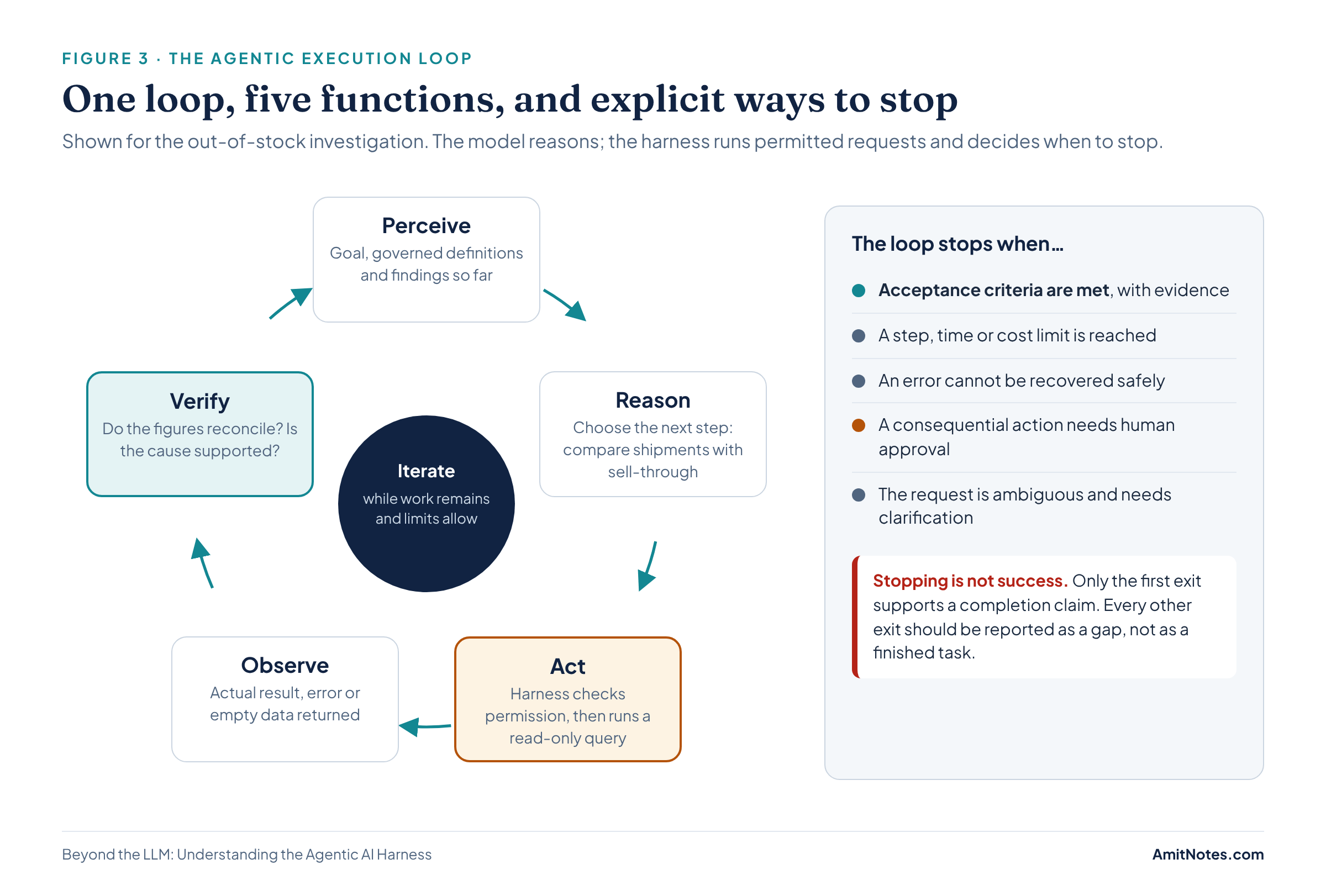
From defining the decision to running an agent that reasons, uses tools and acts within trusted boundaries.
Consider a key account manager starting her day with a simple question: “What changed in my accounts since yesterday that needs my attention today?”
Today the answer takes a good part of her morning. She checks orders against forecast, scans for service failures and late deliveries, looks for a competitor promotion or a price change, reviews open claims and deductions, and reads yesterday’s notes in the CRM. A dashboard shows her some of these signals, one screen at a time. A conversational analytics tool lets her ask about them in plain language. An AI agent can do the routine work for her. It can check every account against agreed definitions, pull signals together from several systems, separate real issues from noise, and greet her with a short, prioritized list. Each item explains why it matters, shows the evidence behind it and suggests a next step she can approve.
The same pattern applies in finance, procurement, supply chain, HR and customer service. Wherever people investigate a problem across several systems before making a decision, an agent can help. That is why so many organizations are now trying to build one. Most of the difficulty, however, sits outside the model. Teams often start with a framework or a model, connect a few tools and write a clever prompt. Weeks later they discover that nobody agreed what a good answer looks like, that the agent calculates a key metric differently from finance, and that there is no way to tell whether last week’s prompt change made things better or worse.
The starting point for building an AI agent should be the decision it needs to support, not the technology used to build it.
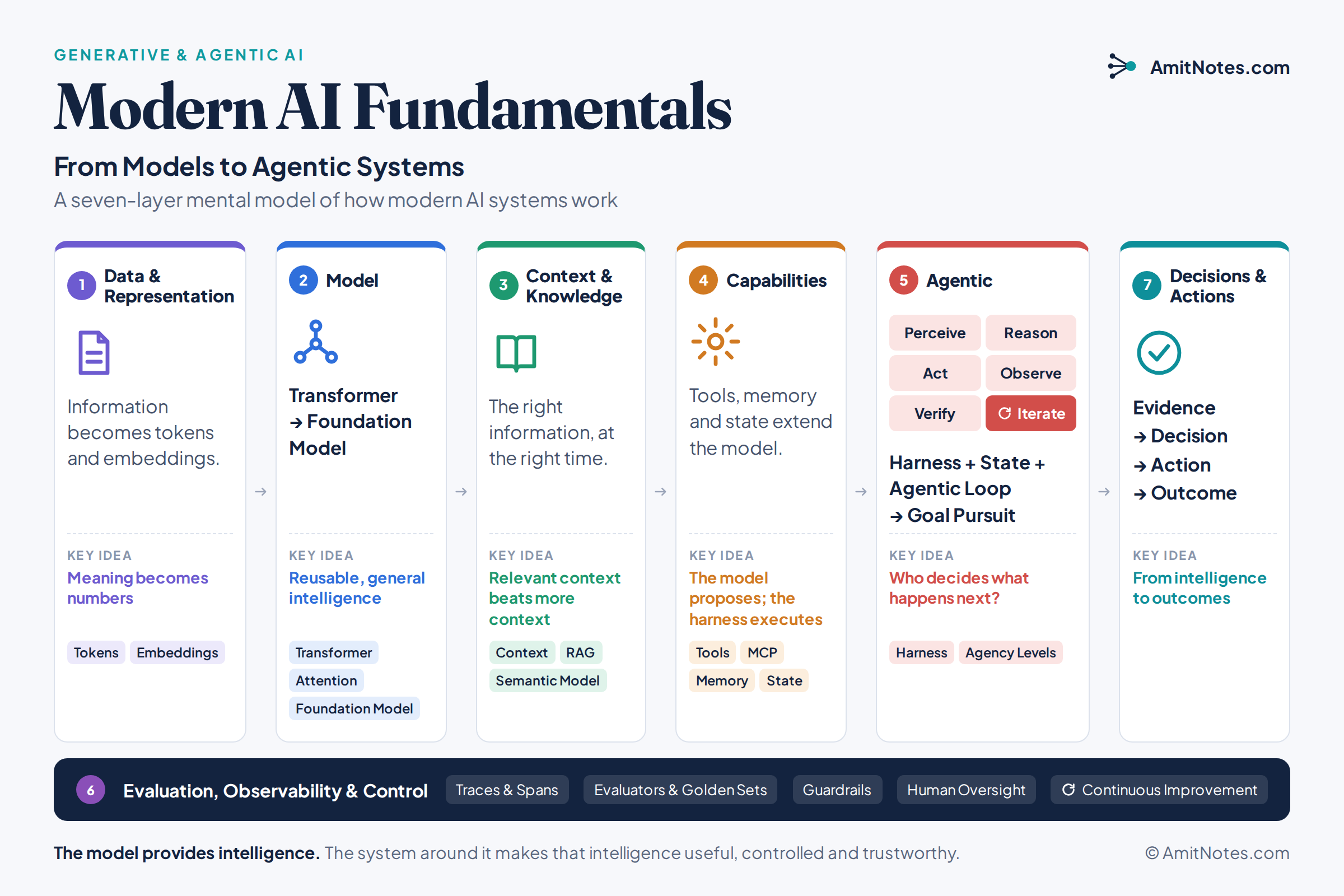
This blog post is the third in a series. Modern AI Fundamentals explained what an agent is and where it sits among the layers of a modern AI system. Beyond the LLM: Understanding the Agentic AI Harness explained the software scaffolding around the model that lets it use tools, check its work and stay within limits. This post is about the build itself: the eight steps a team works through, in the order the decisions depend on each other, and what good looks like at each step.
Not every problem needs an agent
Before the eight steps, one honest question. If a task can be handled reliably by a report, a fixed workflow or a single model call, adding agentic behavior mostly adds cost and things to test. The useful rule is to build the simplest system that works and add autonomy only where the task genuinely needs it. Agents pay off when the path to the answer cannot be fully scripted in advance: several steps, several systems, and choices that depend on what the last step revealed. A straightforward weekly account performance report usually does not need an agent. Investigating unexpected changes across several systems, deciding which issues deserve attention and recommending the next action may justify one.
The eight steps at a glance
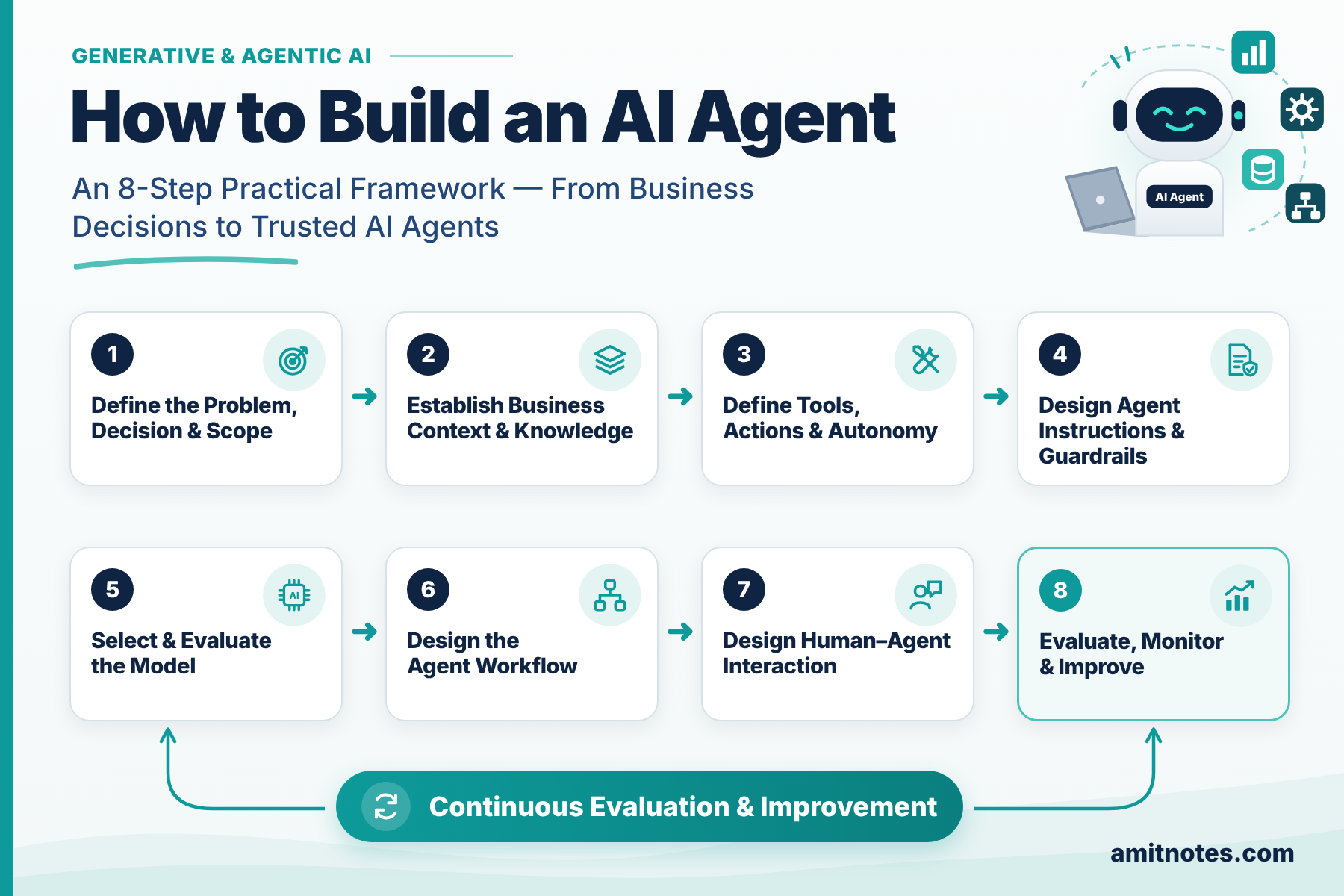
The framework follows a simple principle: start with the business decision, establish the context and capabilities required to support it, and then design the intelligence and workflows around those requirements.
Each step builds on decisions made earlier. The business objective determines what the agent needs to understand. Business context informs the tools it needs. Tools and permissions shape its instructions. Only then can we evaluate which model and orchestration approach will work best.
Although presented as eight steps, agent development is iterative rather than strictly sequential. Evaluation begins with the first use case and continues through design, development, deployment and improvement.
- Define the problem, decision and scope: who uses the agent, for which decision, what success means, and the test cases that will prove it.
- Establish business context and knowledge: approved definitions, relationships and rules, so correct data leads to correct conclusions.
- Define tools, actions and autonomy: a small set of well-defined tools, with autonomy set by the consequence of each action.
- Design agent instructions and guardrails: role, context, method, output and guardrails, knowing that prompts guide behavior but do not enforce it.
- Select and evaluate the model: the lowest-cost configuration that meets the agreed quality, speed and permission requirements.
- Design the agent workflow: orchestration, runtime limits, recovery from failure, approval points, state and memory, and the single-agent versus multi-agent decision.
- Design human–agent interaction: evidence, transparency, correction and approval, built around how the user decides.
- Evaluate, monitor and improve: traces, regression tests and fresh samples of real use, long after launch.

One agent through all eight steps
Before going through the steps one by one, here is how they apply to the key account manager’s morning check from the opening:
| Step | The account manager’s agent |
|---|---|
| 1. Define the problem, decision and scope | Decide which account issues need attention today. The agent investigates and recommends; the manager decides. Success means a short, trusted priority list before her first call. |
| 2. Establish business context and knowledge | Agreed definitions for forecast variance, service failure, open claim and an “at risk” account, plus each account’s contract terms. |
| 3. Define tools, actions and autonomy | Read-only tools such as get_sales_vs_forecast, get_service_incidents and get_open_claims. Creating a follow-up task needs her approval; nothing is ever sent to the customer. |
| 4. Design agent instructions and guardrails | Check each signal against the approved definition, rank issues by impact and urgency, cite the evidence and flag missing data. |
| 5. Select and evaluate the model | Compare candidate configurations on past mornings where the right priorities are already known, and choose the cheapest that gets them right. |
| 6. Design the agent workflow | Run every morning before she starts, check accounts in parallel, stop within a time and cost budget, and keep a record of what was checked. |
| 7. Design human–agent interaction | A short ranked list, each item with its evidence and a suggested next step she can approve, edit or dismiss. |
| 8. Evaluate, monitor and improve | A golden set of past mornings, a trace of every run, and a record of which flagged issues she acted on and whether they were real. |
Step 1: Define the problem, decision and scope
The first step is to agree what the agent is for, in terms precise enough to test. This sounds obvious, yet it is where most agent projects quietly lose their way: a team experiments with frameworks before anyone has written down the business problem, the users or what a good outcome looks like.
A useful scope answers five questions. What decision does the agent support, and who makes it? What does the user need from the agent to make that decision faster or better? How will we know it works, in measurable terms? What are the boundaries: which data it may see, which actions it may take, and where it must stop and hand over? And how much should it decide on its own: inform only, recommend, or initiate actions?
The answers should be specific enough to settle arguments later. Name the user role, not “business users”. State the decision, not “insights”. Say plainly whether the agent only informs, recommends, or is allowed to take some actions, and list the actions it must never take. Define success in business terms, such as time to a reliable answer, accuracy against an agreed reference, or adoption by the target users, as well as response quality.
Two habits make this step far more useful.
Turn adjectives into conditions you can check. “Accurate” and “helpful” cannot be tested. “The revenue figure matches the finance-approved calculation for the same period” can. So can “every finding cites the records behind it” and “when data is missing, the agent names what it would need rather than guessing.” These become the acceptance criteria for everything that follows.
Write the first test cases now, not at the end. Collect a handful of real past situations where the right answer is already known, including one or two where nothing unusual happened and the right answer is “no clear cause”. Each case records the question, the data available at the time and the expected findings. This starter set is the first version of the evaluation in Step 8. It forces precision now, and later it lets the team compare models, prompts and tools on evidence instead of impressions.
Key output: a one-page agent specification covering users, decision, success criteria, boundaries and autonomy level, plus a starter set of test cases with known answers.
Step 2: Establish business context and knowledge
Access to data is not the same as understanding the business. An agent can retrieve technically correct data and still reach the wrong conclusion, because enterprise metrics carry meaning that does not live in the tables.
Take any metric a business argues about. Net sales may be before or after returns, rebates and trade spend. Gross margin may include or exclude freight. A customer may count as “lost” after one missed order cycle or after twelve months of no purchases. On-time delivery may be measured per order, per order line or per shipment. An agent that computes these from raw tables with its own reasonable-sounding assumptions will produce confident numbers that disagree with the ones the leadership team sees every week. From that moment, nobody trusts anything else it says.
The remedy is to give the agent the organization’s meaning before giving it data. In practice that means four things:
- Approved definitions for every metric the agent may use, ideally through a governed semantic model or metric layer rather than definitions retyped into a prompt.
- Relationships between the business entities involved, such as how customers relate to contracts, orders, products and regions, and which hierarchies roll them up.
- Business rules and exclusions that change interpretation, such as which transactions are out of scope or which thresholds trigger action.
- Known data caveats, such as a source that updates a day late or a field that is unreliable for certain periods.
This step also tests the organization’s existing data foundations. If people cannot yet agree on a definition, an agent will not fix that. It will expose the disagreement, quickly and at scale. That is a useful finding in its own right, and a good reason to treat semantic grounding as a design step rather than a technical detail.
Key output: the approved metric definitions, entity relationships, business rules and data caveats the agent depends on, exposed through governed sources it can query.
Step 3: Define tools, actions and autonomy
A model can interpret a question and reason about it, but it cannot see live enterprise data or change anything without tools. Tools are where the agent meets the business, which makes them the most consequential design surface in the build.
The common integration routes are well known: APIs and custom functions, SQL and analytical services over governed data, retrieval over documents and policies, the Model Context Protocol (MCP) as a standard way to expose tools to any compatible application, and interfaces to other agents. The harder questions are about design.
Few, narrow and clearly named. An agent chooses tools by reading their names and descriptions, so a vague tool is a tool used wrongly. A tool such as get_sales_vs_forecast(account, period), with a clear description of each parameter, is far safer than a general run_sql(query). Each tool needs a contract: what goes in, what comes out, and what it returns when something fails. A timeout, an empty result and a permission error should look different to the agent, because each calls for a different next step.
Here is what a call to get_sales_vs_forecast can return, and what the agent should do with each result:
| What the tool returns | What it means | What the agent should do |
|---|---|---|
| Valid result | Sales and forecast figures for the account and period | Use them, citing the source and period |
| Empty result | The query worked but found no records | Say that no data was found; never read it as zero sales or a decline |
| Timeout | The source system did not respond in time | Retry once; if it still fails, report the account as not checked |
| Permission denied | The user is not allowed to see this account | Stop for that account and say access is restricted; never look for a way around it |
The tool contract defines these four outcomes; the instructions in Step 4 tell the agent how to respond to each. Without both, an empty result can easily turn into a confident but false story about falling sales.
Read before write. A first release usually needs only read tools: the data and documents the agent must examine. Actions that change external systems, such as creating a task, updating a record, saving a draft to a CRM or sending a customer message, can be introduced later with appropriate permissions and approvals.
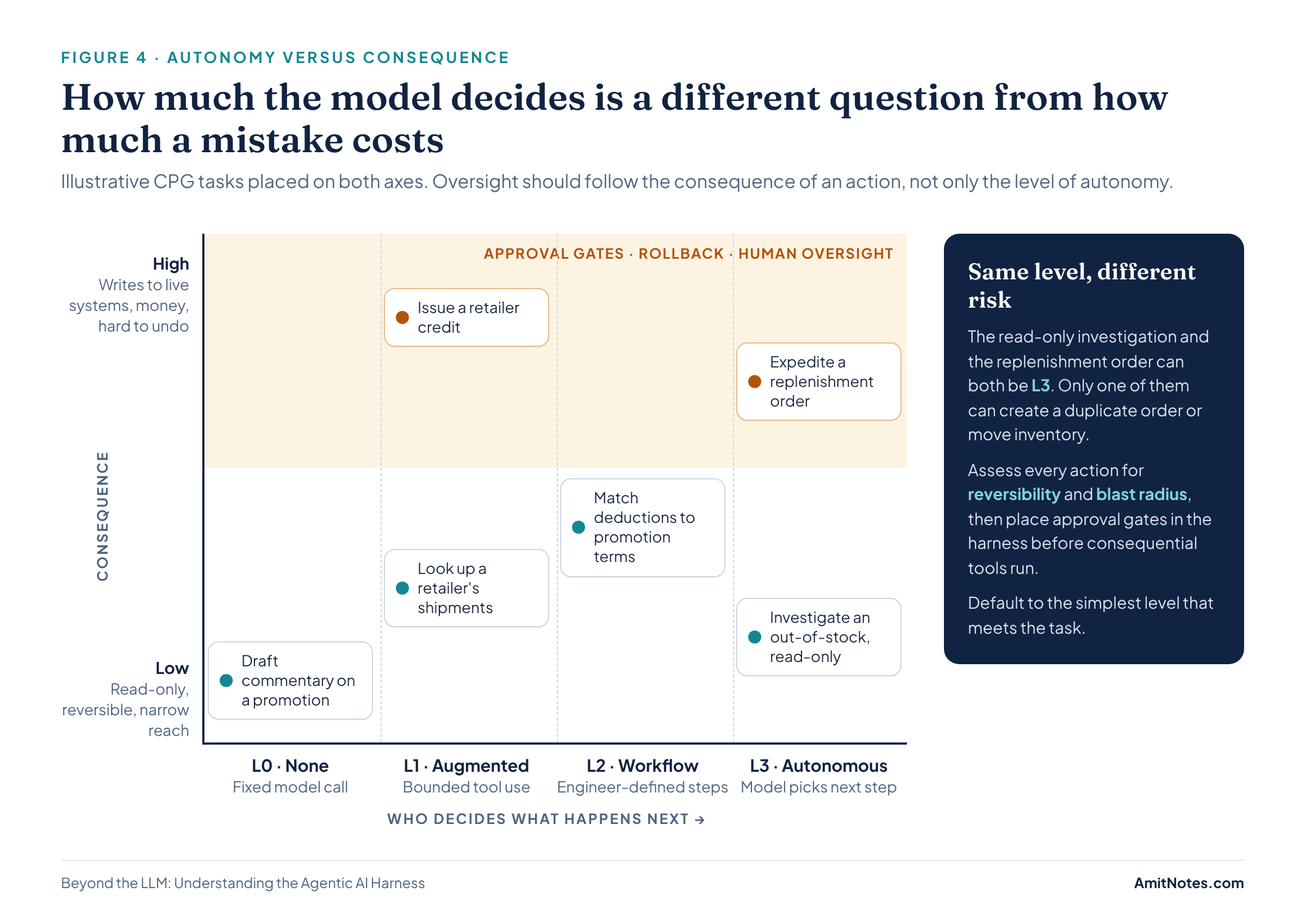
Set autonomy by consequence, not by capability. How much an agent decides on its own is only half the question. The other half is how much damage a wrong decision can do: how easily the action can be reversed and how far its effects spread. A read that exposes confidential customer terms, a draft that a person reviews, a task sent to another team and a change to a live production plan sit at very different points on that scale. Two agents with the same autonomy can need very different oversight.
| Type of action | Reversibility / Exposure | Reach if wrong | Typical control |
|---|---|---|---|
| Read business data | No system change; disclosure may be irreversible | Sensitive data seen by the wrong people | Allowed; access limited to what the user may see |
| Draft analysis or a recommendation | Fully reversible | Misleads one decision | Allowed; user reviews before acting or sharing |
| Create an internal task or request | Reversible; can be withdrawn | Another team’s time | Proposed; user approves each one |
| Send a message outside the company | Irreversible once sent | Customer or supplier relationship | User approves exact content and recipient |
| Change prices, orders, plans or master data | Hard to reverse | Customers, revenue, operations | Not permitted, or only through the existing approval process |
Two further safeguards belong here. Treat retrieved text as data, not instructions: a customer email, a supplier document or a page in a knowledge base can contain text that looks like an instruction, and the agent must not follow it. And a tool request is not proof that anything happened. If the agent says it created a task, the application, not the model’s sentence, should confirm that the task exists.
Key output: a tool registry with contracts and failure behavior, and a permission model that maps every action to its reversibility, reach and required approval.
Step 4: Design agent instructions and guardrails
With the decision, the meaning and the tools settled, the system prompt has something concrete to say. This ordering matters. A prompt written on day one tends to be a persona (“You are an expert business analyst”) and a list of hopes. A prompt written after Steps 1 to 3 can describe a method.
A good instruction set for a business agent covers five things:
- Role and goal: what the agent is responsible for, and for whom.
- Business context: which definitions apply and where to find them, rather than restating every rule in prose.
- Method: how to approach an investigation, which tools to use for which questions, and in what order.
- Output: how findings, evidence, uncertainty and recommendations should be presented.
- Guardrails: what the agent must not do, and when it should ask for clarification or escalate.
The method is where most of the value lies. For an investigative agent it might say: confirm the change you are asked about using the approved calculation before looking for causes; break it down by the standard business dimensions before examining individual records; test each candidate explanation against the data rather than accepting the first plausible story; quantify each driver where the data allows; and keep what the evidence shows separate from what remains a hypothesis. The guardrails might say: never present an unsupported explanation as a conclusion; when the data needed to test an explanation is missing, name it instead of filling the gap; never recommend an action outside the user’s authority.
One distinction deserves to be stated plainly, because it is the most common misunderstanding in agent projects: prompts guide behavior, but they do not enforce security. “Do not show other regions’ data” in a prompt is a request. Restricting the data tool to the user’s regions is a control. Prompt rules and code checks have different jobs. The prompt shapes judgment and style; the application enforces access, permissions, approvals and anything else that must hold every single time.
Key output: agent instructions covering role, context, method, output and guardrails, with every hard rule also implemented as a check in the application.
Step 5: Select and evaluate the model
Model choice usually comes early in agent projects, often as the first decision. It belongs here, after the task, tools and instructions exist, because only then is there a real workload to test candidates against.
The main model families, including OpenAI GPT, Anthropic Claude, Google Gemini, Meta Llama and NVIDIA Nemotron, differ in ways that matter for agents:
- Reasoning: can it follow a multi-step method and change course when the evidence contradicts its first hypothesis?
- Tool use: does it pick the right tool, pass valid parameters and interpret the result correctly, including errors?
- Context handling: can it work with the definitions, intermediate results and conversation history it needs without losing track?
- Cost and latency: can it meet response-time and budget expectations at the expected volume?
- Deployment and governance: does it meet requirements for hosting, data residency, privacy and operational control?
The practical way to choose is to run the starter test cases from Step 1 through a small set of candidate configurations and compare them on the same evaluation. Depending on the model and provider, configuration options may include reasoning effort, thinking budgets, tool-use settings and generation parameters. These should be evaluated as part of the overall model configuration rather than treated as interchangeable capabilities. The goal is the lowest-cost configuration that meets the agreed quality, speed and permission requirements, not the most capable model available.
Two cautions help here. First, compare the cost of a completed, verified investigation, not the price per token: a cheaper model that needs three retries and more tool calls can cost more than a stronger one that gets it right first time. Second, more reasoning does not compensate for an unclear requirement or a missing test. If every configuration fails the same case, look at the specification, the tools or the data before buying a bigger model.
Some architectures route between models: a small, fast model classifies the request or handles simple lookups, while a stronger model handles the investigation itself. That can work well, but each route needs its own evaluation.
Key output: a chosen model and reasoning setting, or a routing strategy, backed by results on the agreed test cases, with cost and latency per completed task.
Step 6: Design the agent workflow
Orchestration decides how the work actually flows: which steps are fixed by design, which are left to the model, how intermediate results are kept, what happens when something fails, and where a person steps in.
The first decision is how much of the path to script. Some steps should always happen the same way: validate the starting figures against the approved calculation, apply the standard breakdowns, check the user’s permissions. Those belong in a fixed workflow. Other steps depend on what the earlier ones reveal. If one product line explains most of a decline, the agent should dig into it; if the decline is spread thinly everywhere, it should look for a common cause such as pricing or availability. That part benefits from letting the model choose its next step. Most good enterprise agents are a mix: a designed backbone with model-directed investigation inside it.
A typical flow looks like this. Understand and confirm the request. Gather and validate the core data. Investigate candidate explanations, in parallel where they are independent. Quantify what each one contributes. Draft findings and recommended actions. Then stop and hand over to the user, who approves anything that changes the world outside the agent.
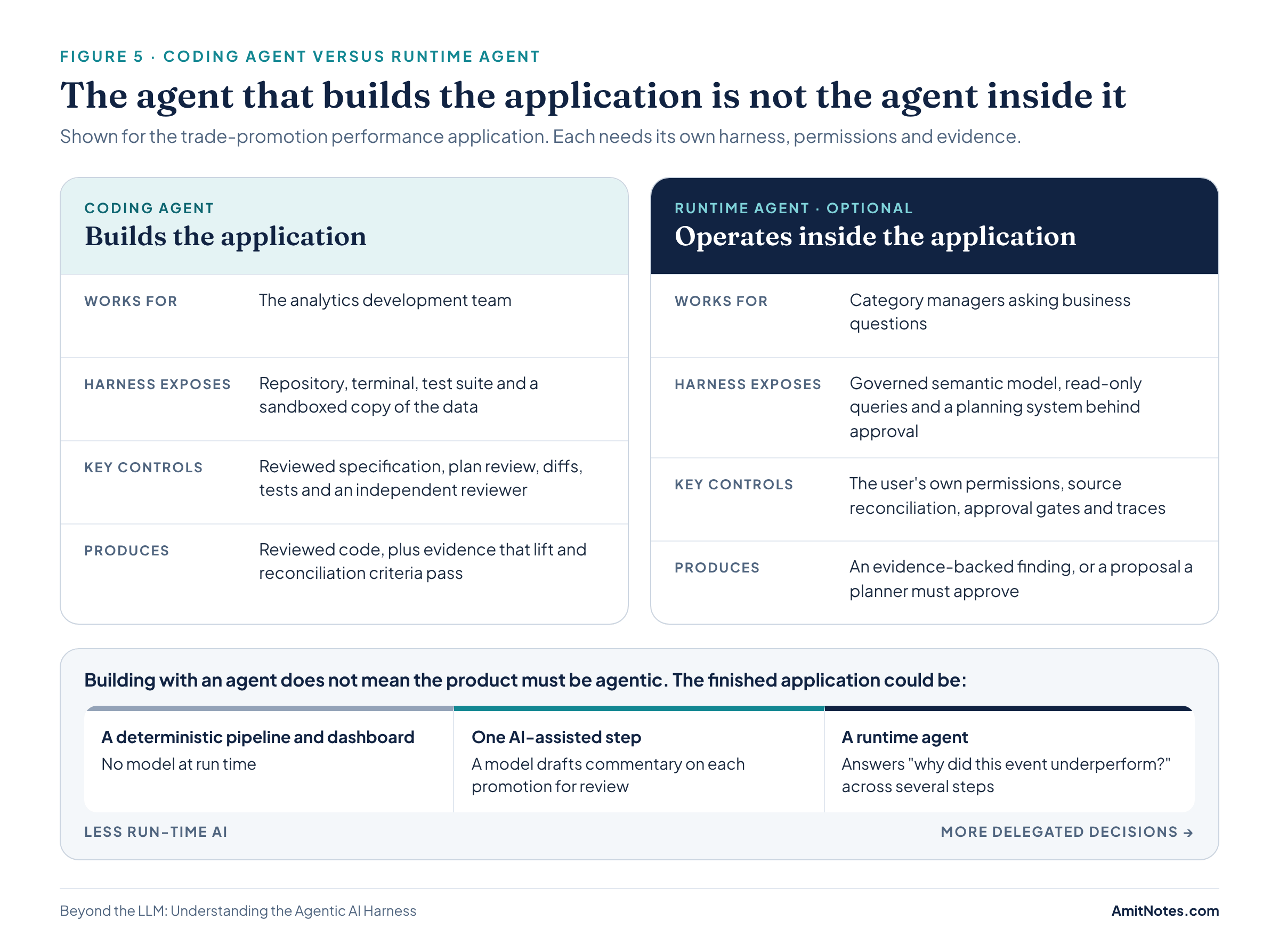
It helps to separate two ideas that are often blurred. Orchestration describes how work is coordinated: which steps execute, how decisions are made, when tools are called and where human approval is required. The agent runtime, or harness, provides the execution environment and controls needed to operate that workflow reliably, including tool execution, state management, permission enforcement, retries and monitoring. In practice, orchestration and runtime capabilities may be implemented within the same framework or platform.
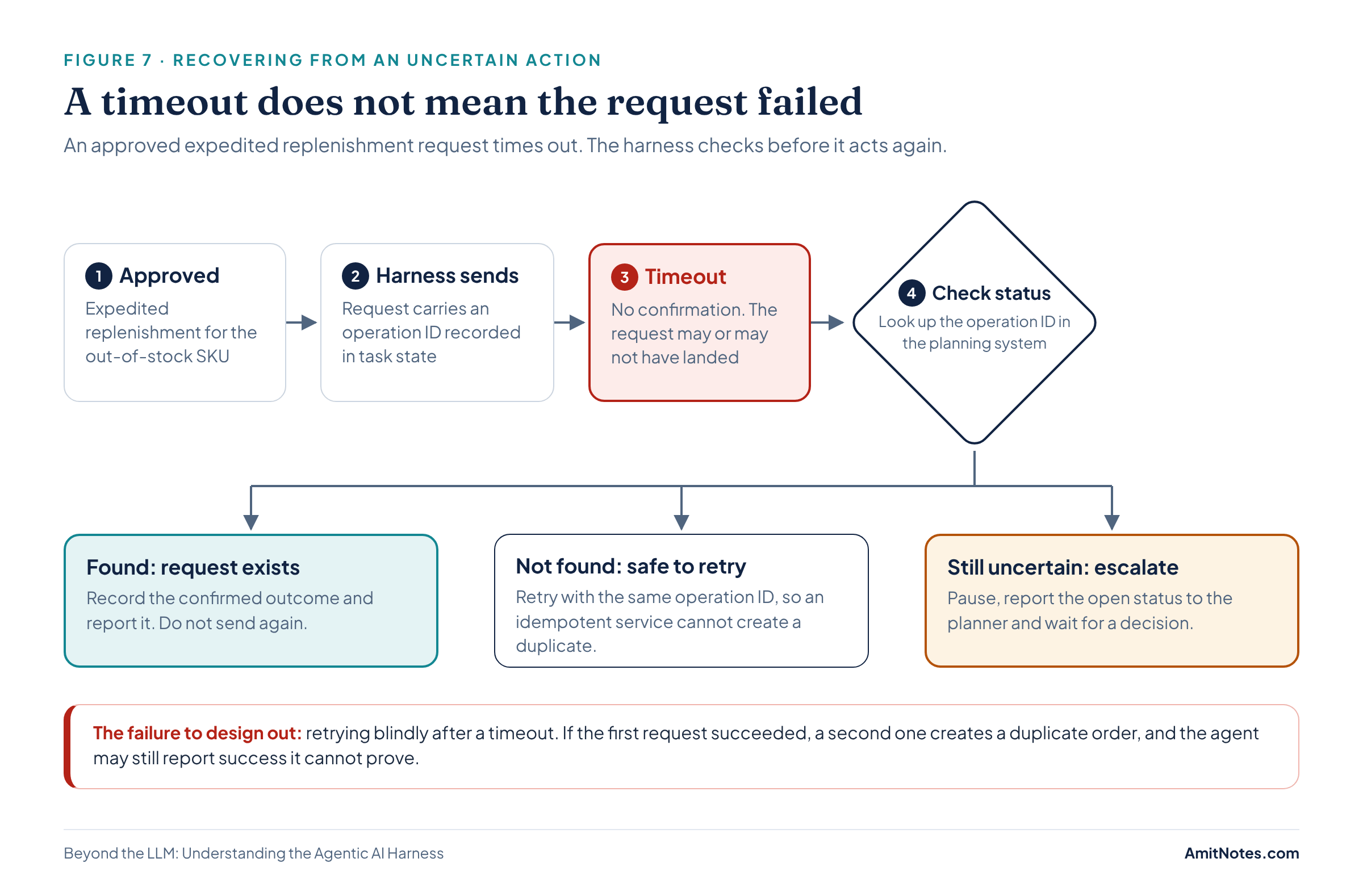
Whatever the pattern, the loop needs limits that the runtime enforces, not the model. A model can propose that it is finished; the harness decides when it must stop. That means caps on steps, time and spend; a defined outcome when a limit is reached (report what was found and what remains open, rather than failing silently); retries with sensible backoff; and careful handling of uncertain outcomes. A timeout on a write does not mean the write failed, so the agent must check before trying again. Approvals belong at the point of action, too. Approving a plan at the start does not authorize a different action the agent decides on later. The harness post covers these mechanics in more depth.
One agent or several? A single agent with well-designed tools is almost always the right starting point. Multiple agents help when subtasks are genuinely independent, need different tools or permissions, or would overload one context. For example, separate investigators for pricing, product availability and customer behavior could work in parallel and return their findings to a coordinator. The cost is real, though. Coordination, debugging, evaluation and token use all grow. In its account of its own multi-agent research system, Anthropic reported that agents typically used about four times as many tokens as chat interactions, and multi-agent systems about 15 times as many. Those figures describe Anthropic’s research workload measured against chat, not agent systems in general, but the direction is worth remembering. Add agents when a single agent demonstrably falls short, not because the architecture diagram looks more impressive.
Frameworks such as LangGraph, Microsoft Agent Framework, OpenAI Agents SDK, Claude Agent SDK and Google’s Agent Development Kit implement these patterns in different ways. For long-running or high-volume work, workflow engines, queues and schedulers may also be needed.
The objective is not to build the maximum number of agents. It is to design the simplest reliable workflow that solves the problem.
Managing context, memory and workflow state
Three kinds of information keep an agent on track, and they are easy to confuse:
- Context: the relevant information available to the model for the current reasoning step, such as the user’s question, the definitions that apply and the latest tool results.
- Memory: information intentionally retained and retrieved across interactions or sessions, such as a user’s preferred views or the outcome of a past investigation.
- Workflow state: a structured record of execution progress, tool results, approvals and pending activities.
An agent’s conversation history is not the same as its workflow state. Conversation context helps maintain continuity with the user, so that a follow-up such as “now compare it with last year” keeps the same scope. Workflow state ensures that tasks can be resumed, retried, audited and completed reliably, even if the conversation ends or a step fails halfway. Long-term memory should be introduced selectively, with clear rules governing what is retained, for how long, who can see it and how it is used. Stale memory quietly introduces outdated assumptions, and authoritative business records belong in the systems of record, not in the agent’s memory.

Key output: a workflow design that separates fixed and model-directed steps, with enforced limits, failure handling, approval points and a reasoned single-agent or multi-agent choice.
Step 7: Design human–agent interaction
An agent’s value depends as much on how people work with it as on what it can do. The interface might be a chat window, a panel inside an existing planning tool, an API called by another system or a background process that reports when something changes. For business decisions, a chat window alone is rarely enough, because people need to inspect evidence, not just read an answer.
A good agent experience helps the user to:
- Ask naturally, in the language of the business, without knowing table names.
- See what the agent is doing: which data it checked and which hypotheses it ruled out.
- Check the evidence behind each finding, down to the records involved.
- Correct the agent, for example to exclude a customer or change the comparison period, without starting over.
- Approve or reject consequential actions, one at a time, with a clear view of what will happen.
In practice, the best answers often combine a short narrative, a chart of the main drivers, the supporting figures and a list of recommended actions. The user can drill into one driver, ask a follow-up question or reject a recommendation, and the agent keeps the context. Recommendations stay proposals until the user approves them, and approved actions are carried out and confirmed by the application, not just promised in text.
This is where human-centered design matters most. The aim is not to show off the model’s intelligence. It is to fit the agent into the way the user actually makes the decision, reduce friction, and leave them in control of what happens next. Done well, it is also how the agent earns trust: users who can see the evidence come back.
Key output: an interaction design covering how questions are asked, how evidence and reasoning are shown, how users correct the agent, and how actions are approved.
Step 8: Evaluate, monitor and improve
Agents are harder to test than ordinary software because their behavior shifts with the prompt, the context, the data returned and the model itself. An agent can write a convincing explanation while using the wrong metric definition, skipping a relevant data source or attributing a change to a cause that the evidence does not support. Testing has to cover the quality of the reasoning and actions, not just whether the code runs.
The evaluation that started as a handful of known cases in Step 1 now grows into a working system:
| Dimension | What to check |
|---|---|
| Calculation correctness | Key figures match the reference calculation for the same scope and period |
| Tool use | Right tools, valid parameters, sensible order, errors handled |
| Grounding | Every finding traces to data the agent actually retrieved; hypotheses are labeled as such |
| Completeness | All material causes considered; nothing dropped silently when a limit is reached |
| Boundaries | No access beyond the user’s permissions; no action without approval |
| Cost and speed | Tokens, tool calls and time per completed task |
| Business usefulness | Did users act on the output, and was it right? |
Five habits make this work.
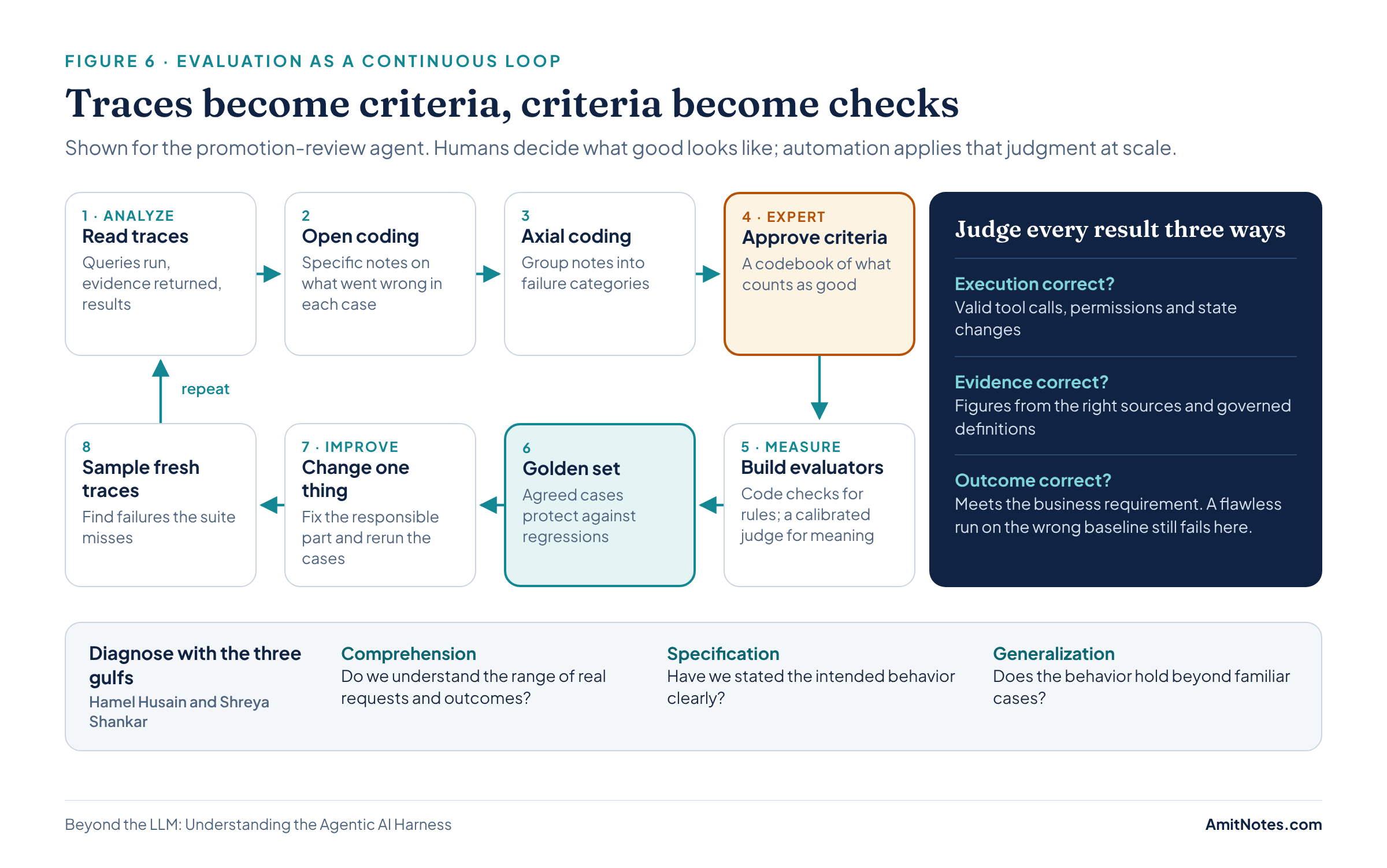
Trace everything. The final answer hides how it was produced. Observability tools such as Arize Phoenix, LangSmith and Langfuse record each model call, tool call, result and error as a trace, so a reviewer can see where an investigation went wrong. Traces provide visibility into observable execution steps and decisions, but they should not be confused with a complete or necessarily faithful record of a model’s internal reasoning.
Read traces before writing graders. Review real runs, write specific notes on what went wrong, then group the notes into failure types. This error-analysis approach, popularized by Hamel Husain and Shreya Shankar, finds the failures that matter instead of the ones that are easy to measure. A domain expert from the business, not the engineering team, decides what counts as a correct answer.
Use code where code can judge. Whether the agent’s figures match the reference calculation is a deterministic check. Whether its explanation is supported by the evidence is a judgment, which an AI grader can help with at scale, but only after its verdicts have been compared against cases the expert has already labeled.
Protect what already works. Every confirmed failure becomes a test case in a growing golden set, and every prompt, tool or model change runs against it before release. Decide what result would justify the release before looking at the scores, and keep some cases untouched so improvements are not simply tuned to the test.
Keep sampling real use. A golden set only catches failures you already understand. Fresh traces from real users show the questions and situations nobody anticipated.
A worked test case
Consider one test question: “Why did net sales decline by 5% in the North region last month?”
Before the agent ever sees it, the team writes down the expected behavior. The agent should verify the decline against the approved net sales definition. It should identify and quantify the principal contributing factors, such as volume, price, mix or a lost customer. It should retrieve evidence for every material explanation, keep findings separate from hypotheses, and take no action it is not authorized to take.
Each part of that expectation is then checked in the way that suits it:
| What is checked | How it is checked |
|---|---|
| Metric accuracy | Deterministic comparison with the reference calculation |
| Explanation quality | Expert review, or an AI grader calibrated against expert judgments |
| Tool permissions | Automated policy and integration tests |
Once the expected behavior is agreed, the case joins the golden set and runs on every future change. A prompt tweak that improves the narrative but breaks the calculation, or a new tool that quietly widens data access, is caught before users see it.
The harness post walks through this evaluation loop in more detail.
Key output: tracing in production, a golden set with expert-approved expectations, code checks and calibrated AI graders, and a release process that runs them on every change.
From business question to approved action
Put together, the eight steps produce something simple to describe. Return to the key account manager’s morning question. The agent reads the signals, investigates them against approved definitions, shows the evidence, and proposes a short list of priorities. She decides what happens next, and the outcomes feed back into tomorrow’s prioritization and the evaluation set.

Measuring business value
It helps to think about evaluation at three levels, each answering a different question:
- Model quality: does the model reason correctly, follow instructions and use tools appropriately?
- Agent reliability: does the end-to-end workflow complete correctly, safely, consistently and within operational limits?
- Business effectiveness: does the agent improve decisions, productivity, adoption or measurable business outcomes?

Step 8 covers the first two levels. The third is the one leadership asks about, and it is the subject of this section.
An agent can pass every technical test and still deliver little, if it does not improve a real business process. Value measurement therefore needs to be designed alongside the technical evaluation, starting from the success criteria in Step 1, not added after launch when someone asks for a business case.
Useful measures usually include:
- Time to a reliable answer, compared with the manual baseline.
- Effort released from routine data gathering and reconciliation.
- Share of outputs that lead to an action, and how often the agent’s findings are later confirmed.
- Adoption: repeat use by the intended users, not just first-week curiosity.
- Business outcomes in the process the agent supports, such as retained revenue, lower cost or fewer service failures, where they can be traced to the agent.
The last measure is the hardest and the most important. Business results move for many reasons, so the agent’s contribution should be separated from other changes wherever possible, for example by comparing teams that adopted it with those that have not yet.
Technical metrics tell us whether the agent works. Business metrics tell us whether it creates value.
From agentic workflows to Decision Intelligence
AI agents are an important capability in the broader evolution of business analytics, but they are not the destination in themselves.
Traditional analytics helps organizations understand performance. Conversational AI makes information easier to explore. AI agents extend these capabilities by coordinating investigations, interacting with enterprise systems and supporting actions. Decision Intelligence brings these elements together around the decisions people need to make.
An agent can investigate why sales declined, but a Decision Product connects that investigation with business context, alternative courses of action, expected outcomes and the workflow through which decisions are made. This distinction matters. Agentic AI provides the ability to investigate and act. Decision Intelligence provides the context and discipline to determine which actions make business sense.
The opportunity is not simply to make existing analytical processes autonomous. It is to redesign how intelligence, human judgment and business execution come together. My next blog post looks at what this means for the future of BI.
A practical way to start
None of this requires a large agent platform or a multi-agent architecture on day one. The teams that get value fastest pick one meaningful, frequent decision and build the smallest agent that supports it well: trusted definitions, a few read-only tools, clear boundaries and a set of test cases with known answers. They test against those cases before anyone outside the team sees it, put it in front of a small group of real users, and learn from the traces.
Only when that first version is reliable and useful do they add capability, one piece at a time: write actions with approvals, scheduled or event-triggered runs, longer-term memory of user preferences, specialist sub-agents or integration with execution systems. Each addition comes with its own test cases. It is the same discipline as good product design: understand the problem, build the minimum useful capability, and improve on evidence.
Before you build: an AI agent readiness checklist
One line per step. If any item is still open, that is where to focus before building further.
- A clearly defined business decision and target user
- Agreed success criteria and known-answer test cases
- Approved business definitions and governed data access
- Tool contracts, permissions and action boundaries
- Model configuration selected through evaluation
- Workflow state, execution limits and failure recovery
- Evidence-based user experience and approval controls
- Production tracing, regression tests and value measurement
Final thoughts: build agents around decisions, not technology
Building an AI agent is not a matter of choosing a model, writing a prompt and connecting a few tools. As the tools mature, building one will keep getting easier. Making it dependable, relevant and valuable will remain a product-design and systems-engineering challenge.
The most successful agents will not be the ones with the most sophisticated model, the most tools or the most autonomy. They will be the ones that solve meaningful problems, operate within trusted boundaries and help people make better decisions.
The future of AI agents is not just about making systems more autonomous. It is about making intelligence more useful, decisions more informed, and actions more effective.
Further reading
- Modern AI Fundamentals: From Models to Agentic Systems, AmitNotes
- Beyond the LLM: Understanding the Agentic AI Harness, AmitNotes
- Building effective agents, Anthropic Engineering
- How we built our multi-agent research system, Anthropic Engineering
- Creating a LLM-as-a-Judge That Drives Business Results, Hamel Husain